Jim: sell & get paid instantly
- 4.4
- Rating
- 100.00K
- Installs
- Free
- Price

 Analysis by App-foxy
JIM.com: Instant Tap to Pay is a finance app from CloudWalk that focuses on one clear idea: turning a compatible phone into a way to accept card payments. I found the concept easy to understand, but its value depends heavily on whether you actually need to collect money away from a traditional checkout. For a small seller, a freelancer, or someone who occasionally takes payments in person, removing the need for a separate card reader can make a noticeable difference.
The app is free, rated for Everyone, and currently listed as version 1.3.44 for devices running Android 7.0 or later. It has reached over one hundred thousand installs, with an average score of 4.3 from more than six hundred ratings. Those figures suggest that the idea has found an audience, although they do not replace the more important question: does a phone-based reader fit the way you do business?
Turning a phone into the payment point
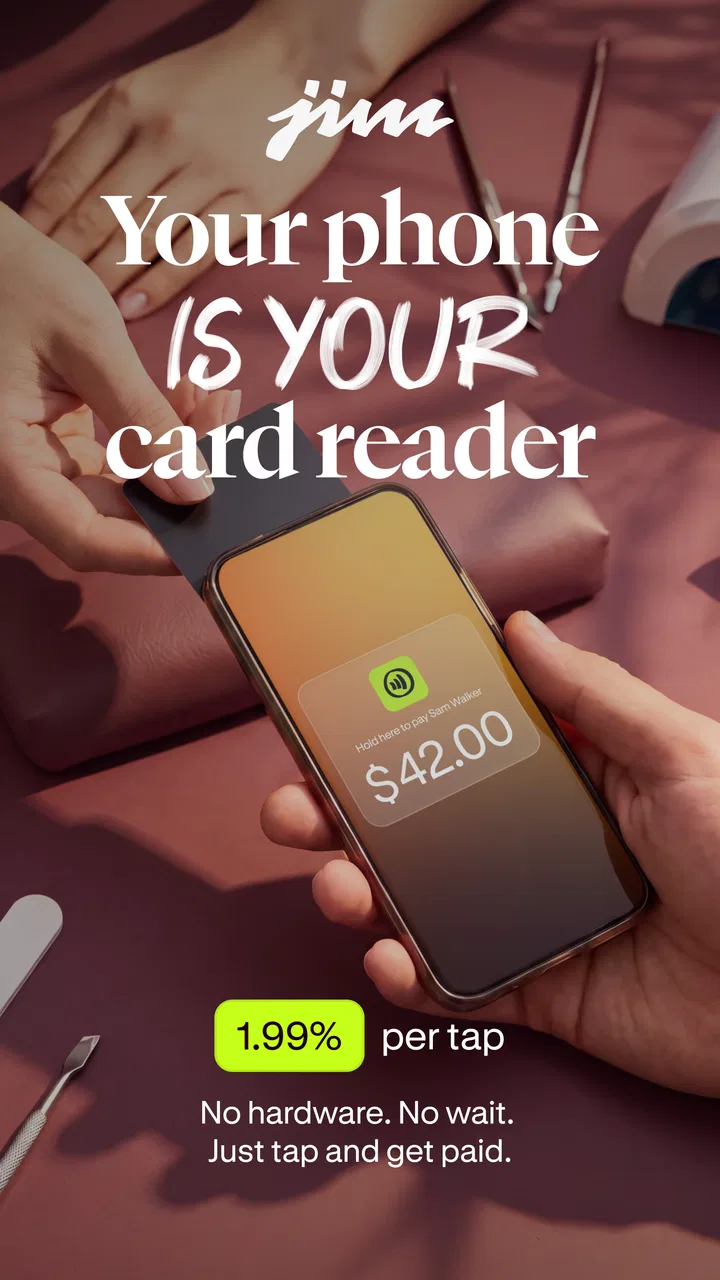
The central capability is contactless payment acceptance through the phone itself. Rather than carrying a dedicated terminal, I can use the app as the starting point for a transaction and let a customer tap a compatible card or device. That changes the physical setup of a sale. The phone is no longer only a communication or ordering tool; it becomes the point where payment is completed.
You May Also Like

 Blood Strike: 2.5 Anniversary
Blood Strike’s Loadouts Turn Every Drop Into a Tactical Gamble
A close look at Blood Strike’s custom loadouts: how fast access to signature weapons reshapes its battle royale rhythm, rewards preparation, and narrows the gap between fights.

 Pandora - Music & Podcasts
Pandora’s Music Is Easy to Start, but Harder to Recover
Pandora’s strength is its low-effort path from a seed to a station. Its weak spot is how much confidence it asks you to place in connection, setup, and quiet recovery.

 8 Ball Pool
 Is Built on Rivalries, Rematches, and Routine
A close look at the rivalries, rematches, shared routines, and unanswered safety questions that turn a quick pool match into a persistent mobile community.

 Samsung Music
’s Quiet Strength Is Playing What You Already Own
Its reach comes less from spectacle than from dependable access to a personal library. That simplicity is both the app’s strongest retention engine and its ceiling.

 AccuWeather: Weather Radar
AccuWeather Review: A Quick, Clear Forecast for Everyday Decisions
For everyday plans, the best forecast is the one you can understand quickly. AccuWeather makes rain timing, radar, and local conditions easy to act on, with a few trade-offs.

 Hill Climb Racing
Why Hill Climb Racing Still Turns Crashes Into One More Run
A tiny car, a bumpy hill and one more upgrade: Hill Climb Racing keeps resurfacing because its simple chaos makes every near-miss feel personal.
More From Our News Desk



That distinction matters most in situations where portability is more useful than a full checkout system. A market stall, a mobile service, a quick collection after a job, or a small event does not always justify carrying extra hardware. With JIM.com, the appeal is not that it replaces every payment setup. The appeal is that it reduces the number of things I need to bring when the sale happens somewhere other than a fixed counter.
I also like the narrow focus. Many finance apps try to combine banking, budgeting, transfers, invoices, and business administration. JIM.com presents itself around the act of getting paid by tap. That makes it easier to evaluate: if contactless acceptance is the problem I need to solve, the app has a direct answer. If I am looking for a complete business finance platform, I should not assume that a focused payment tool will cover every surrounding task.
The practical benefit is not just convenience; it is fewer physical dependencies at the moment a customer is ready to pay. A separate reader can be useful, but it also needs to be carried, charged, paired, and remembered. A phone-based approach can make spontaneous sales more realistic, especially for people who already keep their phone close throughout the working day.
What the tap changes for the customer
From the customer’s side, the interaction can feel more familiar than handing over cash or waiting for a manual card process. The customer brings a contactless card or device near the phone, and the payment happens at the same point where I am managing the transaction. That can make a short exchange feel less formal and less cluttered.
There is also a useful psychological effect in small transactions. When the payment method is ready immediately, I am less likely to tell someone that I can only accept cash or that they need to find an ATM. For a person selling a single item, collecting a fee after a visit, or taking payment while moving between customers, that flexibility can be more valuable than a long list of extra financial tools.
Still, contactless acceptance is not the same as universal payment acceptance. A customer who prefers cash, has a card without contactless capability, or cannot use a compatible device may need another option. I would treat JIM.com as a strong additional route for payment, not as a reason to discard every backup method.
How I would use it during a real sale
The most sensible workflow begins before the customer is standing in front of me. I would install the app, sign in or complete the required setup, and make sure the phone is ready for a payment session. I would also check the device’s compatibility and keep the operating system within the supported range. These are small preparations, but they matter because a payment tool is judged at the exact moment when delay is most visible.
Once the amount is ready, the phone becomes the surface used for the tap. I would present it clearly, ask the customer to bring the contactless card or device near it, and wait for the transaction to finish before treating the sale as complete. That last step is important. A quick tap feels simple, but I should still verify the result in the app rather than relying only on a sound, vibration, or the customer’s assumption that it worked.
For repeated sales, I would create a small routine: confirm the amount aloud, keep the screen visible, complete the tap, and check the result before moving to the next person. This is one of the less obvious advantages of a focused app. The phone can stay in the same workflow instead of making me switch between a separate reader and another screen for the amount.
A second useful habit is keeping the phone positioned for both parties. If I hold it too low, turn the display away, or cover the area where the customer should tap, the process becomes awkward. A dedicated terminal often communicates its purpose through its shape. A phone does not, so I need to make the interaction obvious with my own instructions.
A realistic everyday example
Imagine I provide a mobile repair or personal service and finish a visit at the customer’s home. I have already done the work, but I do not want to carry a separate terminal for occasional appointments. With JIM.com ready on my phone, I can calculate the amount, show it to the customer, and accept a contactless payment before leaving.
The advantage here is not only saving space in a bag. It also reduces the chance that payment becomes an afterthought. I do not need to send the customer away to arrange cash or postpone the transaction simply because I am away from a shop counter. For a small operator, that can make the end of a job feel more complete and professional.
There is a tradeoff in that same scenario. If the phone battery is low, the internet connection is unreliable, or the customer cannot use contactless payment, the convenience disappears quickly. I would therefore keep a practical fallback, such as another accepted payment method or a way to arrange payment later. The app can simplify collection, but it cannot remove every condition required for an electronic transaction.
Preparing for busy moments
JIM.com makes the most sense when I prepare for the environment rather than simply installing it and hoping it works. At a busy stall, I would position the phone where customers can reach it without knocking it over. At a service appointment, I would open the payment flow before the final conversation about the amount. For occasional use, I would test my routine during a low-pressure sale so I am not learning the process while several people are waiting.
This preparation also helps with privacy and trust. I would avoid announcing sensitive information unnecessarily, keep the screen visible only as much as needed, and let the customer complete the tap without handing over control of the phone. A phone reader is convenient, but because the device looks personal, clear handling reassures the customer that the transaction is intentional.
Where the app is strongest
The best scenario is a small, mobile operation with relatively straightforward payments. Think of an independent seller at a temporary location, a freelancer meeting clients in person, or a service provider who does not want a permanent checkout arrangement. In these cases, the phone is already part of the working kit, so adding payment acceptance to it can reduce setup effort.
It is also a good fit for someone who accepts payments irregularly. A separate terminal may feel excessive if I only need to take card payments during occasional events or a handful of appointments. JIM.com gives that person a way to explore phone-based acceptance without paying for another piece of equipment. Since the app itself is free, the initial barrier to trying the approach is low, though I would still pay attention to the terms and transaction details that apply to actual payments.
Another strong use is as a backup for a small shop or service business. Even if I normally use a conventional terminal, a phone-based option can be useful when the main reader is unavailable or when I need to take a payment away from the counter. I would not automatically replace a proven checkout system, but having a second route can reduce dependence on one device.
The app is less convincing for a business that needs a complete sales operation. If I require inventory management, printed receipts, staff accounts, detailed reporting, table service, or integration with a broader register, I would look at a full point-of-sale solution instead. A phone accepting a tap solves the payment moment; it does not automatically become the rest of the business.
Compared with a traditional card reader
A dedicated reader usually wins on physical clarity. Customers recognize it immediately, staff can leave it in one place, and it may be easier to use repeatedly during a long shift. It can also keep payment activity separate from my personal phone. For a busy permanent counter, those advantages may outweigh the convenience of avoiding extra hardware.
JIM.com wins on mobility and simplicity of equipment. I can carry one device rather than a phone plus reader, and I do not have to remember a separate terminal for every occasional payment situation. That makes the app particularly attractive when sales happen in changing locations or when the payment volume does not justify a more elaborate setup.
Compared with cash, the app can remove the need to carry change and count notes during a quick exchange. Compared with a bank transfer, a tap can feel more immediate and familiar for a customer who expects a card-style payment. Neither comparison makes the app universally better. Cash does not depend on a phone battery, while transfers may suit people who already work digitally and do not need an in-person card experience.
My choice would depend on frequency. For occasional mobile collection, I would favor the lighter setup. For constant, high-volume use at a fixed location, I would be more cautious and compare the phone workflow with a dedicated terminal before changing anything that already works.
The tradeoffs I noticed before relying on it
The first limitation is dependence on the phone. With a reader, the payment device is separate from the phone I use for calls, navigation, messages, and work. With JIM.com, the same device may be doing everything. A low battery, a damaged screen, a notification interruption, or a phone that is needed for another urgent task can affect the payment process.
The second limitation is customer expectation. Some people may understand a contactless terminal instantly, while others may hesitate when asked to tap a phone. I would explain the process calmly and keep the amount visible. That extra explanation is minor, but it becomes noticeable when several customers are waiting.
The third is that a phone reader is not ideal for every cardholder. Contactless capability is central to the experience, so I would not promise that every card or payment situation will work the same way. Keeping an alternative available is sensible, particularly for mobile sellers who cannot easily send a customer to another checkout point.
I would also be careful about treating the app as a substitute for business records. Even if accepting a payment is fast, I still need my own method for tracking sales, refunds, expenses, and customer communication if those tasks matter to my work. A focused payment app can be part of a good workflow without being the entire workflow.
There is a subtle operational tradeoff as well. A phone is familiar, but familiarity can encourage casual handling. I might place it on a crowded table, pass it around, or leave it unlocked while serving several people. I would use a dedicated position for payment, keep the screen under my control, and finish each transaction before starting another. That discipline is more important when the payment tool is also my everyday personal device.
Questions I would settle before the first customer
Would I use it for a one-off sale? Yes, if the phone is compatible, the setup is complete, and I have a fallback. Would I use it as the only payment method for a full day of trading? Only after testing the workflow and understanding how it behaves under repeated use. The difference is not the app’s central idea; it is the cost of failure when the phone is unavailable.
Do I need a separate card reader? Not necessarily. If my work is mobile and my payment volume is modest, the phone may be enough. If multiple people need to take payments, if the phone must remain available for other work, or if customers expect a permanent terminal, separate hardware may still be the better tool.
Is it suitable for personal use? I see the strongest case in situations where I am collecting money as a seller or service provider. Someone who rarely accepts payments in person may not gain much from installing it. The app is most useful when the ability to receive a contactless payment solves a recurring practical problem.
What should I do if a payment does not appear to complete? I would stop and verify the result inside the app before trying again. Repeating a tap without checking can create confusion for both sides. If the transaction remains unclear, I would use the backup method rather than rushing the customer through a second attempt.
Can it replace accounting software? I would not assume that. I would use it for the payment interaction and maintain whatever separate records my work requires. That separation is healthier than expecting one narrow tool to manage every financial responsibility.
Who gains the most from the phone-first approach
The clearest audience is the independent worker who already carries a phone and wants to accept contactless payments without adding much equipment. A mobile stylist, repairer, tutor, market seller, or event vendor can all understand the appeal. The app is also worth considering as a backup for a small business that normally relies on a conventional terminal but sometimes needs to collect money away from its main location.
I would be less enthusiastic for a large team, a fixed retail counter, or a business that needs detailed checkout controls. Those users may benefit more from a dedicated point-of-sale system with a visible terminal and broader management tools. The phone approach is not inferior in every case; it is simply optimized for flexibility rather than a complete front-of-house operation.
CloudWalk’s app has a clear purpose, and that clarity is its biggest strength. It does not need to persuade me that a phone can solve every finance problem. It only needs to make the payment moment easier for people who work away from a traditional register. In that role, it is a practical option rather than a universal replacement.
After using the concept as a real workflow, my recommendation is straightforward: try JIM.com if you need occasional or mobile contactless acceptance and prefer carrying one device. Prepare a backup, test the process before a busy event, and keep separate records for the wider business side. If you need a full checkout system or cannot afford phone-related interruptions, choose a dedicated alternative instead.
For the right user, the difference is pleasantly simple. A customer is ready, I open the payment flow, the card or device comes close to the phone, and the sale can move on without a separate reader taking up space. That focused convenience is enough to make this free finance app worth considering, provided I treat it as a payment tool—not as the whole business.
FAQs for Jim: sell & get paid instantly
01What is JIM.com: Instant Tap to Pay?
JIM.com: Instant Tap to Pay is a mobile app designed for seamless and secure transactions via your smartphone. It allows users to make payments instantly by tapping their phones at compatible terminals. The app supports multiple payment methods and is designed to enhance user convenience and transaction speed.
02Is JIM.com compatible with all smartphones?
JIM.com is compatible with most modern Android and iOS devices that support NFC (Near Field Communication) technology. Ensure your smartphone has NFC capabilities and is running on an up-to-date operating system to fully utilize the app's features. Check the app store for compatibility details specific to your device.
03How secure is JIM.com for transactions?
JIM.com prioritizes user security by incorporating advanced encryption technologies and biometric authentication, such as fingerprint or facial recognition. Each transaction is encrypted, ensuring your personal and financial information remains protected. Regular security updates also help safeguard against potential vulnerabilities.
04Can I store multiple payment methods in JIM.com?
Yes, JIM.com allows users to store multiple payment methods, including credit and debit cards from various banks. This feature provides flexibility and convenience, allowing users to choose their preferred payment method for each transaction. Simply add your cards during setup and select the default payment method.
05What should I do if I encounter issues using JIM.com?
If you experience any issues with JIM.com, such as transaction errors or technical glitches, you can access the in-app support feature. The app offers a comprehensive help section and customer support via email or chat. Additionally, ensure your app is updated to the latest version to prevent known issues.
Pros
- Seamless integration with multiple banks.
- User-friendly interface with quick setup.
- Supports both NFC and QR code payments.
- Strong security with encryption protocols.
- Instant transaction notifications.
Cons
- Limited support for international currencies.
- Requires constant internet connection.
- Occasional app crashes reported by users.
- Not available on all devices.
- Some features locked behind paywall.

Jim: sell & get paid instantly
Gallery